Voice assistants and dictation hear more than many people realize.
Speech Recognition: Voice Assistants, Dictation and What They Hear
Speech recognition is built into almost every modern device: phone keyboards offer a microphone button, smart speakers wait for a wake word, cars take voice commands, and video and meeting apps generate automatic captions. It is convenient, and it is useful for creators who caption videos or transcribe interviews. It also means a microphone is often listening for a trigger, and when it activates, the recording or its transcript may be sent to a company’s servers, stored, and in some cases reviewed by people.
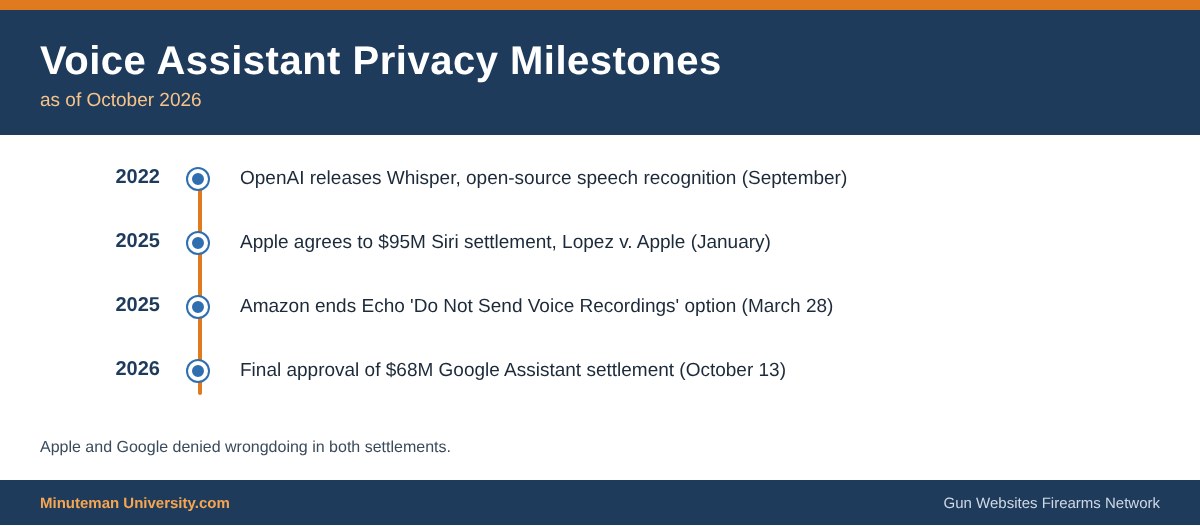
Accidental activations are a documented problem, not a theory. Apple agreed in January 2025 to a $95 million settlement in Lopez v. Apple over claims that Siri recorded conversations without being deliberately triggered. Google’s $68 million settlement of similar Google Assistant claims (Kumandan v. Google, N.D. Cal.) received final approval on October 13, 2026. Both companies denied wrongdoing. Amazon ended the “Do Not Send Voice Recordings” option on certain Echo devices on March 28, 2025, so voice requests on those devices are now processed in the cloud.
For gun owners, the concern is simple: conversations near a phone, speaker or car about what firearms are in the home, where they are stored, travel plans or private advocacy strategy are exactly the kind of personal details best kept off third-party servers. The goal is not to give up useful tools but to control when the microphone is live and where the audio goes.
Where Speech Recognition Shows Up
- Phone assistants (Siri, Google Assistant, Gemini) and keyboard dictation
- Smart speakers and displays (Amazon Echo, Google Nest, Apple HomePod)
- Vehicle voice controls and connected-car apps
- Automatic captions and transcripts in video, podcast and meeting software
- Smart TVs and remote controls with microphones
Tips for 2A Users
- Turn off always-listening wake words on devices that do not need them, and use the physical mute switch on smart speakers.
- Review and delete stored voice history in each account’s privacy settings, and opt out of human review where offered.
- Prefer on-device processing where the device offers it. Open-source tools such as OpenAI’s Whisper (released September 2022) can transcribe recordings entirely on a local computer.
- Do not dictate sensitive messages, passwords, serial numbers or permit numbers.
- Before uploading interviews for transcription, check the service’s terms on storing and using customer audio.
Related: Internet Privacy, Audio Hosting, eMail Apps and Using Technology & the Internet.
Sources
- PPC Land: Google’s $68M Assistant settlement wins final approval
- TechCrunch: Echo to send all voice recordings to the cloud starting March 28
- OpenAI Whisper (open-source repository)
 Another of the conveniently inconspicuous yet dangerous applications of technology is the voice recognition / hands free typing applications no matter what software you find it in
Speech Recognition has a few aspects to keep in mind for 2A:
- more on the way
- ..more about Social Platforms
- …more about Audio Hosting
- …More about Video Hosting
- …more about Video Streaming
- …more about Messaging Apps
- …Mapping Apps
- … eMail Apps
- …. more about Speech Recognition
- … more about HAM Radio
- … more about Vehicles
- … more about Server Software
- … more info about Browsers