Using Google Sheets: Organizing 2A Advocacy Data
Google Sheets is a free, browser-based spreadsheet that several people can edit at the same time, which makes it a practical command center for a 2A group, club or content team. One shared workbook can hold a contact list, a legislator tracker, a bill tracker, an event calendar and volunteer sign-ups, each on its own tab, so everyone works from the same current information instead of scattered emails.
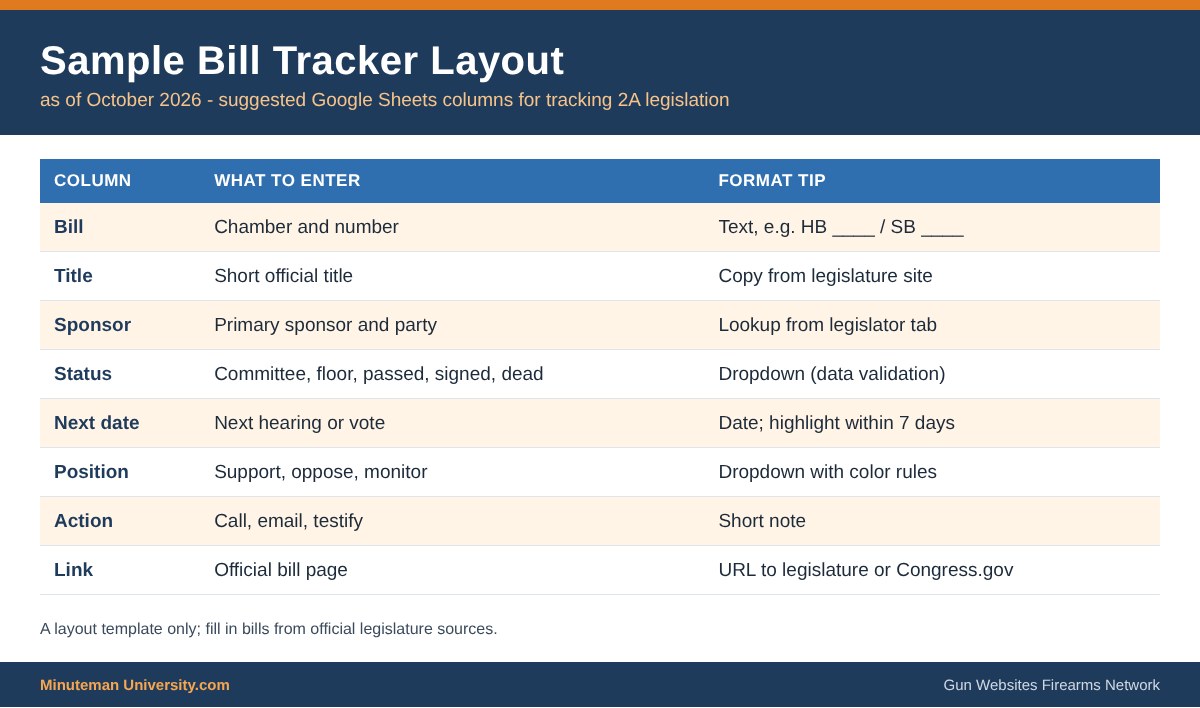
Common advocacy layouts. A legislator tracker lists each member’s name, chamber, district, committees, office contact, stated position and the date of the last contact. A bill tracker records the bill number, short title, sponsor, current status, next hearing date, the group’s position and a link to the official page on the state legislature site or Congress.gov. An event tab can list hearings, rallies and range days with dates and locations, and can feed a public calendar such as Gun Calendars.com. For sign-ups, a Google Form can send each response automatically to a linked sheet, with no retyping.
Formulas that save time. FILTER pulls matching rows into a live view, such as every bill with a hearing this week. XLOOKUP, added to Sheets in August 2022, and the older VLOOKUP match a legislator’s name to their district or committee from another tab. IMPORTRANGE brings a range from a separate spreadsheet into the current one after access is granted once, so a statewide coalition can combine chapter sheets into one dashboard. COUNTIF, data-validation dropdowns and conditional formatting make status columns easy to scan.
Sharing and privacy. Sheets offers Viewer, Commenter and Editor roles, and a link can be limited to named people or opened to anyone with the link. Member and donor lists deserve care. The Supreme Court recognized the privacy of an association’s membership list in NAACP v. Alabama (1958) and struck down California’s donor-disclosure requirement in Americans for Prosperity Foundation v. Bonta (2021). A 2A organization should collect only the data it needs and keep it restricted.
Key Facts
- Forms to Sheets: Google Forms can save responses to a new or existing spreadsheet, with one row per response.
- August 2022: Google added XLOOKUP to Sheets alongside named functions.
- IMPORTRANGE: Requires the spreadsheet URL and a range, and asks once for permission to connect the two files.
- Permissions: Owners can set Viewer, Commenter or Editor access, protect specific ranges or tabs, and review version history to undo changes.
- Associational privacy: NAACP v. Alabama (1958) and Americans for Prosperity Foundation v. Bonta (July 1, 2021) protect membership and donor information from compelled disclosure.
Tips
- Keep one tab per purpose, freeze the header row and use dropdowns for status fields so entries stay consistent.
- Link every bill to its official legislature page or Congress.gov rather than copying text that will go out of date.
- Share sensitive tabs only with named accounts, never “anyone with the link,” and remove access when volunteers leave.
- Don’t collect firearm-ownership details, Social Security numbers or other sensitive data the group does not need.
- Publish public-facing views, such as an event list, from a separate sheet that contains no member data.
- Use the same habits for store and campaign records. See Building an Online Store and Setting up an IndieGoGo Campaign.