2A Skills · Create 2A ContentPhotos, videos, posts and live shows carry the message further than any one conversation.Create safely, legally and within platform rules.
The best tool is the one you will actually use. Free options cover most needs.
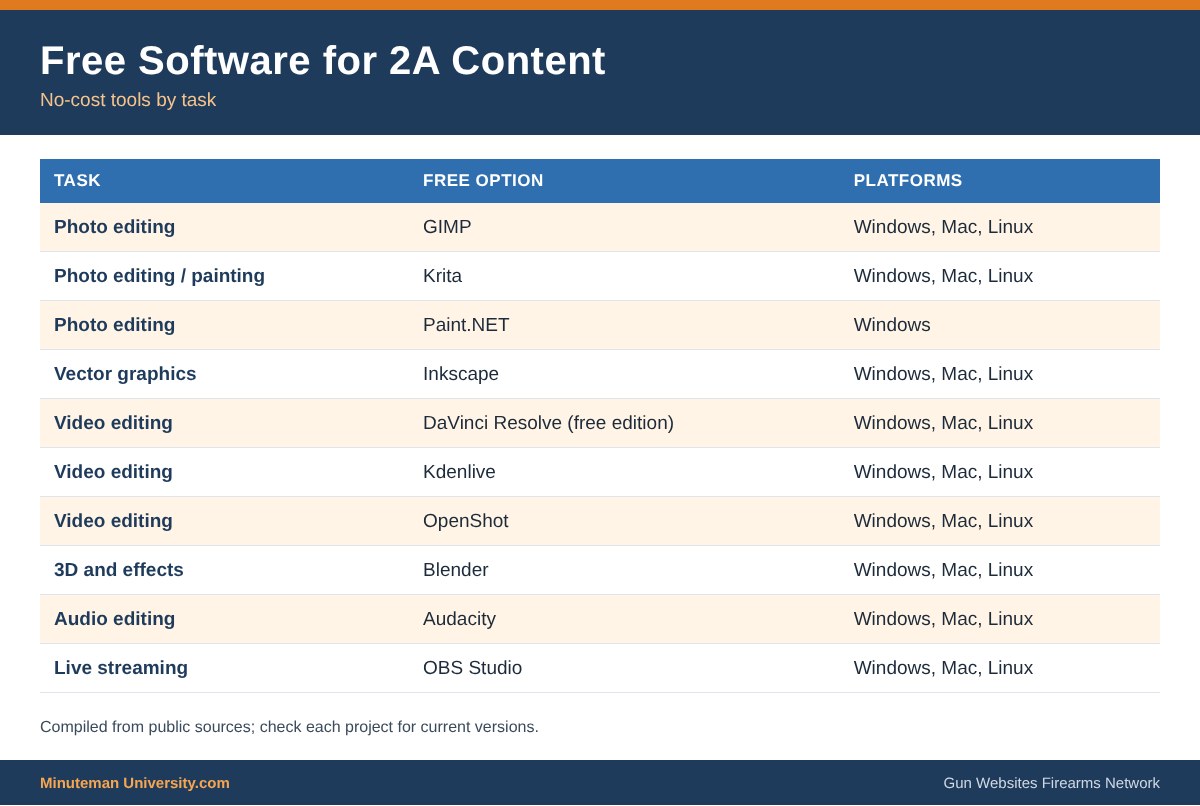
ImagesFree editors such as GIMP, Krita and Paint.net.
Video and audioFree editors and recorders handle most projects.
Paid optionsMore power and support when the project grows.
FREE Options
Paid Software
Paid Options offer Power, Options and Support over Free Options.. usually
But not always
We list the FREE Options and Paid Options separately, and rank each, in order of average preference
Image Software (Rastor)
These are for editing photographs and high resolution still images
- Adobe PhotoShop
- Affinity Photo – Windows, Mac, iPad $49.99
- Pixelmator Pro – Mac $49.99
- Corel PHOTO-PAINT – Windows $599.99
- Corel Paint Shop Pro – Windows $79.99
- Gimp – Windows, Mac, Linux FREE
- SumoPaint – Web Based FREE or $4.00/mo Pro
- Acorn – Mac $29.99 Sketch – Mac $99/yr or FREE
- Krita – Windows, Mac, Linux FREE
- Paint.net – Windows FREE
- Pixlr – Web Based, iOS, Android FREE
Vector Image Software
These are used for logos, cartoons, signs and machine drawings (printers, cutters, etc)
- Affinity Designer – Windows, Mac, iOS $50.00
- Adobe Illustrator
- CorelDRAW Graphics Suite – Windows $200
- Sketch 52 – Mac $99.00
- Autodesk Graphic – Mac $29.99
- Inkscape – Windows, Mac, Linux FREE
- Vectr – Web Based, Mac, Windows, Linux, Chromebook FREE
Video Editing Software
Use these for editing and creating movies & videos
- Adobe Premiere
- Davinci Resolve – Windows, Mac, Linux FREE or $299 Studio
- Vegas Pro – Windows $199 and $799 for the Suite
- Avid Media Composer – Windows, PC $199/year
- Final Cut Pro – Mac $299 PowerDirector – Windows $99.99 Ultra $129.99
- Ultimate Lightworks – Windows, Mac, Linux FREE or $19.90 Pro
- HitFilm Express – Windows, Mac FREE / $351.00 Pro
- Apple Final Cut Pro X – MAC $300
- VideoPad – Win, Mac, And/iOS FREE, $39.95/$69.95
- Windows Movie Maker – Windows FREE
- Apple iMovie – Mac, iOS FREE
- OpenShot – Windows, Mac, Linux FREE
- KdenLive – Windows, Mac, Linux FREE
Video Effect Software
Use these for special effects and animations on videos
- Adobe After Effects
- Apple Motion – Mac $299.00
- Fusion – Windows, Mac, Linux $299.00
- Filmora – Windows, Mac $59.99
- Blender – Windows, Mac, Linux FREE
Audio Editing Software
USe these for editing and creating audio and sound files
- Adobe Audition
- Logic Pro X – Mac $79.99
- Reaper.fm – Windows, Mac, Linux $60.00
- Ableton Live – Win, Mac $99.00/$499.00/$799.00
- Pro Tools – Windows, Mac $599.00
- Reason – Windows, Mac $399.00
- FL Studio Producer – Windows, Mac $199.00
- CuBase Pro – Window, Mac $ 290.00
- Audacity Windows, Mac, Linux FREE
- GarageBand – Mac FREE
- Cakewalk – Windows – FREE
- Shortcut – Windows, Mac, Linux FREE