The browser sees everything you research. Choose and set it up with care.
Browsers: Choosing and Setting Up a Browser for 2A Research and Advocacy
The browser is the window through which nearly all online 2A work happens: reading court opinions, contacting legislators, running a website, posting to platforms and shopping for gear. It is also one of the largest sources of data about the person using it. Every site visited can see an IP address, set cookies, and read dozens of small details (screen size, fonts, time zone, graphics hardware) that together form a “browser fingerprint” able to recognize a device even after cookies are cleared. For gun owners, that matters because browsing history can reveal ownership, carry habits, travel and political activity to advertisers and data brokers.
No browser makes anyone anonymous, and none is the right answer for every task. The practical approach is to know what each mainstream option does by default, separate everyday browsing from sensitive research, and adjust a few settings. One recent change is worth knowing: Google announced in April 2025 that Chrome would keep third-party cookies rather than phase them out, and in October 2025 it retired most of its Privacy Sandbox replacement technologies. Cross-site tracking in Chrome therefore depends largely on the settings the user chooses.
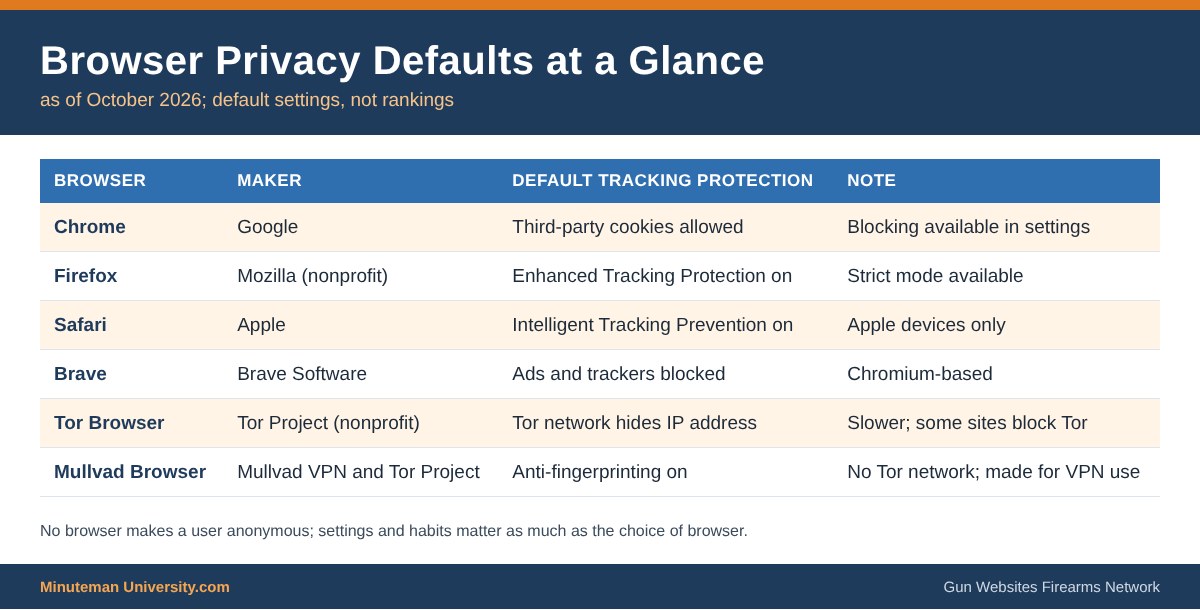
Mainstream Browsers at a Glance
- Google Chrome: the most widely used browser; syncs history and passwords to a Google account when signed in. Third-party cookies remain on unless blocked in settings.
- Mozilla Firefox: open source, run by the nonprofit Mozilla; Enhanced Tracking Protection is on by default and can be set to Strict.
- Apple Safari: default on iPhone and Mac; Intelligent Tracking Prevention limits cross-site cookies.
- Brave: built on Chromium (the same engine as Chrome) with ad and tracker blocking on by default.
- Tor Browser: from the nonprofit Tor Project; routes traffic through the Tor network to hide the user’s IP address and is designed to make all users look alike. Slower, and some sites block it.
- Mullvad Browser: released in April 2023 by Mullvad VPN and the Tor Project; Tor Browser’s anti-fingerprinting design without the Tor network, intended for use with a VPN.
What 2A Users Should Know
- Use separate browsers or profiles for logged-in accounts (email, social platforms) and for research, so one account’s tracking does not follow every search.
- Turn off browser sync to a cloud account unless it is needed, or use a sync service with end-to-end encryption.
- Install as few extensions as possible; extensions can read every page visited. A single reputable content blocker covers most needs.
- Check a browser’s tracking protection with the EFF’s free Cover Your Tracks test.
- Private or incognito mode only stops history from being saved on the device; websites, employers and internet providers can still see the traffic.
- Browsers themselves do not filter firearm content, but search engines, ad networks and the platforms reached through them apply their own firearm policies.
Related: Internet Privacy, eMail Apps, Mapping Apps and the main Using Technology & the Internet section. Network hub: Gun Websites.com.
Sources
- EFF: Cover Your Tracks
- Engadget: Google has killed Privacy Sandbox
- Mullvad: Mullvad Browser announcements
- The Tor Project
 Browsers are the software on a Phone or PC that navigate us to the internet, to websites, apps or file hosts
Browsers have a few aspects to keep in mind for 2A:
- more on the way
- ..more about Social Platforms
- …more about Audio Hosting
- …More about Video Hosting
- …more about Video Streaming
- …more about Messaging Apps
- …Mapping Apps
- … eMail Apps
- …. more about Speech Recognition
- … more about HAM Radio
- … more about Vehicles
- … more about Server Software
- … more info about Browsers